
An Integrated Platform for CDISC SEND
Dataset Preparation & Validation
NexiSEND turns a structured SEND workbook into XPT datasets, Define-XML and an nSDRG, with controlled corrections, an audit trail and electronic signatures.
One controlled workflow, on your own infrastructure
SEND packages are prepared under tight quality systems. NexiSEND is built to fit inside them.
- Runs on your server
Hosted in your own Windows Server environment. Users work in a browser.
Control over where study data lives.
- One integrated workflow
Terminology checks, XPT, Define-XML, validation, nSDRG, packaging and study data charts in one place.
Fewer disconnected steps, with consistent checks.
- Controlled corrections
NexiSEND finds issues. Authorized users make supported corrections, and checks can be rerun.
Better oversight of data changes.
- Audit trail and e-signatures
Key activities are traceable through a tamper-evident audit trail. Author and Reviewer sign electronically.
Traceability and structured approval.
- Vendor support
Vendor access is disabled by default and opens only for a time-limited, audited window.
Support access that stays off until authorized.
- Validation documentation
Built to support 21 CFR Part 11 and GxP validation. IQ runs automatically at installation, and OQ runs from a built-in tool.
Documentation to support your validation.
Designed for nonclinical data teams
- Pharmaceutical and biotechnology companies
Preparing SEND packages for their own studies.
- Contract research organizations
Producing SEND deliverables for sponsors.
- Regulatory operations teams
Managing nonclinical submission deliverables.
- SEND data management specialists
Preparing and completing SEND deliverables.
From study workbook to a released package
Seven stages, in this order.
- Upload & data corrections
- Upload a structured SEND Excel workbook, one worksheet per domain.
- Browse each domain and make data corrections before the study moves on.
- Controlled terminology check
- Check terminology against the release and implementation guide selected for the study.
- XPT generation
- Generate SAS transport (XPT) datasets from the workbook.
- Define-XML
- Generate Define-XML 2.1 and its Define Specification workbook.
- A revised specification can be uploaded to update the Define-XML.
- Validation
- Run conformance checks with NexiSEND's native rule engine.
- Findings are reviewed and tracked, and checks can be rerun.
- nSDRG
- Generate an nSDRG draft from the study data and validation results, for expert review and completion.
- Package & electronic signatures
- Assemble the package.
- Author and Reviewer sign it electronically.
Every correction leaves a record
Each audit entry is cryptographically linked to the one before it, so any change to recorded history can be detected.
Read about the controls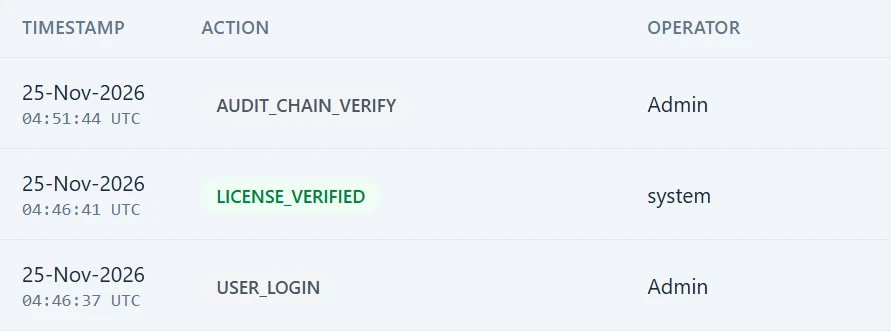
Security controls designed for regulated environments
Documented controls for sessions, logins and backups.
What teams ask first
Where does our study data go?
Study datasets, corrections and audit records stay within your organization's infrastructure. NexiSEND is hosted on your own Windows Server and used through a browser.
What input does NexiSEND need, and what does it produce?
It takes a structured SEND Excel workbook prepared by your SEND expert. It produces XPT datasets, Define-XML with its Excel specification, and an nSDRG draft, assembled into a package. It does not convert raw laboratory or LIMS data into SEND.
Does NexiSEND support 21 CFR Part 11?
NexiSEND is built to support 21 CFR Part 11 and GxP validation, with an audit trail, electronic signatures and access controls.
What validation support does NexiSEND provide?
We provide the validation documentation. Installation qualification (IQ) runs automatically at installation, and operational qualification (OQ) runs from a built-in tool. Your team performs performance qualification (PQ) using your own data and workflows.
How does vendor support access work?
Vendor access is off by default. For support, you upload a signed, time-limited, single-use support file issued for your server. It opens a short, audited window, and you can end it at any time.
Can we review study data inside NexiSEND?
Yes. Integrated views cover the study overview, body weight and laboratory charts, organ weight, food and water consumption, vital signs, ECG, pharmacokinetics, summary statistics, individual animal records, and macroscopic, microscopic and clinical pathology views for the selected study.
Does NexiSEND automatically correct validation findings?
No. NexiSEND identifies findings. Authorized users make supported corrections after previewing the affected records, each with a recorded reason, and checks can be rerun.
Which SEND standards does NexiSEND support?
SENDIG 3.1.1, SENDIG-DART 1.2 and SENDIG-GeneTox 1.0. The implementation guide and controlled terminology release are selected for each study, and the checks follow the guide you choose. Define-XML 2.1 is generated alongside XPT.
How are backups handled?
NexiSEND includes backup and archive tools with SHA-256 integrity verification, and a documented offline recovery procedure.
How is NexiSEND licensed?
NexiSEND is licensed per installation as an annual subscription, based on the number of studies. Users are unlimited, and support is included for the license term. We cover pricing in a demo.